
What does your AWS setup need to look like at seed stage? At Series A? When your first healthcare customer asks for a HIPAA BAA? The answer changes at every stage — and the decisions you make early are the hardest ones to undo.
Below: four company growth stages — pre-product-market fit, early-stage, scale-up, and established — and the AWS setup that fits each one. The framework applies to any startup on AWS. If you’re in healthcare or another regulated industry, there’s a dedicated section at the end with what changes for you.
What’s in this guide
- Why a multi-account strategy matters for startups
- Stage 1 — AWS setup for pre-product-market fit startups
- Stage 2 — AWS setup for early-stage startups
- Stage 3 — AWS setup for scale-up companies
- Stage 4 — AWS setup for established companies
- One rule for every stage
- What’s different for regulated startups
Why a multi-account strategy matters for startups
In AWS, accounts are the strongest isolation boundary you get. Think of them as separate boxes — putting everything into one box is rarely a good idea, but the right number of boxes depends on where the company is.
If you want to go deeper on the conceptual model, AWS has a whitepaper on organizing your AWS environment using multiple accounts. This post focuses on the practical decisions at each startup growth stage and what to prioritize when you’re moving fast.
Multi-account strategies come with real trade-offs. More accounts mean more setup cost, more baseline to maintain, more time spent hunting for things, and a level of expertise required to operate at scale. Think of it this way: if you live in a one-room apartment, everything is in that one room. If you have five rooms, you run around looking for your keys.
So the right strategy is the one that matches where you are now and lasts until your next stage — without forcing a rebuild every time the business changes.
Stage 1 — AWS setup for pre-product-market fit startups
At the earliest stage, the optimization is for survival. You have a co-founder, maybe one or two other engineers, very limited money, and a runway that is running away from you with the money you spend every month. Trust within the team is total. Focus is on finding product-market fit.
For most companies at this stage, a single AWS account is fine. The team uses the root user, maybe chases credits across cloud providers, and runs everything in one place. This is not the moment to over-engineer.
But there are a few small decisions that pay for themselves later. These three are worth calling out specifically because they are hard to reverse once you have made the wrong choice:
Don’t put your databases in the default VPC. Moving a database out of the default VPC after the fact is painful. AWS’s VPC creation wizard now gives you a sensible starting point — use it. Go to VPC, create VPC, select “create other resources,” and AWS will give you a decently designed network you can stick with for a long time.
Create a multi-region customer-managed KMS key. If you encrypt your database with an AWS-managed key, you are stuck in one region. Backups, disaster recovery, and any future multi-region strategy become a re-encryption headache. AWS-managed keys also can’t be shared between accounts — which becomes a problem the moment you split development and production into separate accounts. Create one customer-managed multi-region key, and be done with it.
Create a separate management account for AWS Organizations. Even with one workload account, create a second account to be the organization management account for AWS Organizations. Stitching this in later — when production is already running in your management account — is a problem worth avoiding for the cost of twenty minutes of clicking.
Twenty minutes of work at this stage saves you a couple of thousand dollars and a few days of work later.
Even at this early stage, the minimum structure worth setting up is two accounts:
- Management account (AWS Organizations only)
- Production account (your MVP lives here)
Twenty minutes of setup, and a foundation that won’t need to be ripped out at stage 2.

Stage 2 — AWS setup for early-stage startups
At this stage, the startup has some funding. There is something resembling a product. The team is bigger, but trust is still high and decisions are still fast. Time is limited because there is no money to spare.
This is where environment separation becomes necessary. Development and production should not share an account. If something breaks in development, production should keep running. Most teams know this in principle — they tend to delay it in practice.
A reasonable shape at this stage:
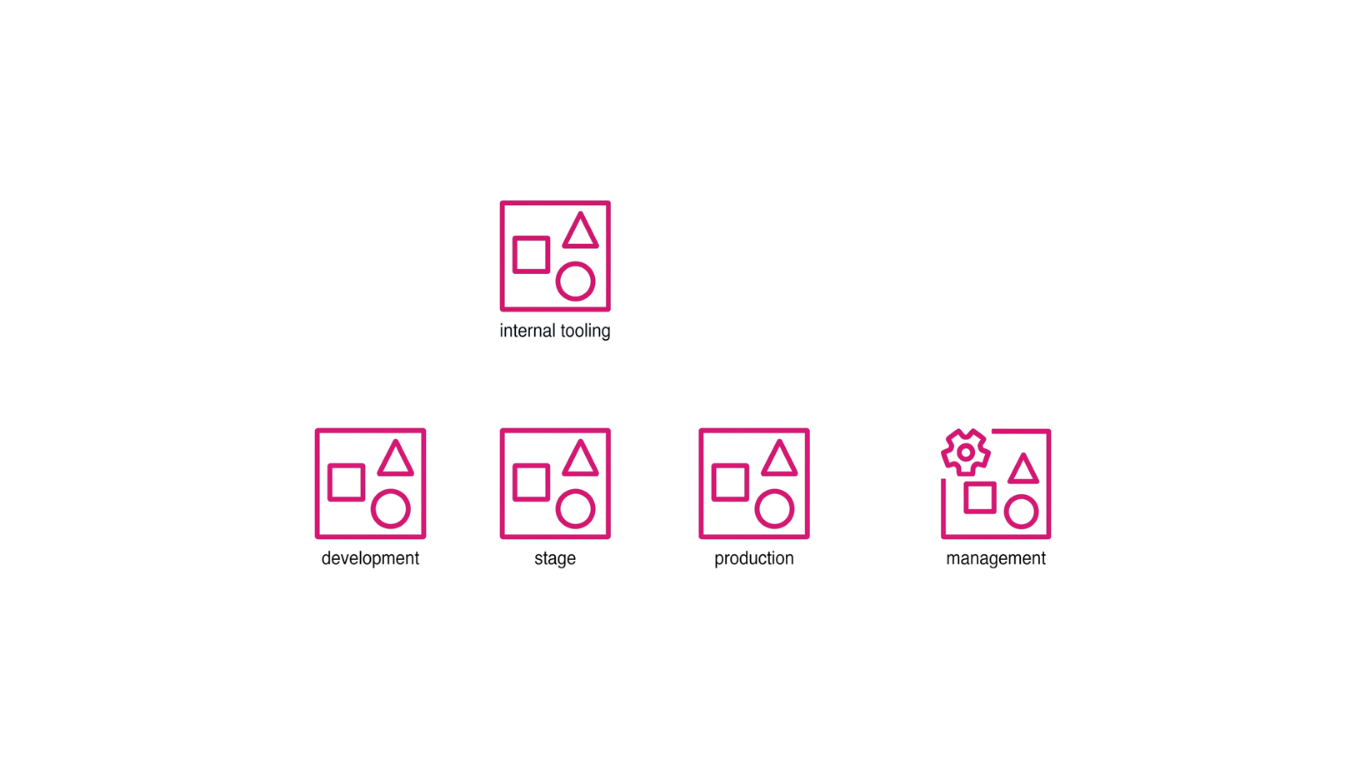
- Management account (AWS Organizations only)
- Development account
- Staging account
- Production account
- Tooling account (for VPN, internal services, monitoring)
For SaaS companies serving multiple customers, it’s also worth considering whether each customer tier — or even each enterprise customer — should have its own isolated production account. This is more work upfront, but it simplifies compliance, reduces blast radius, and makes it easier to give customers the isolation guarantees they’ll eventually ask for.
With more accounts comes a new problem: access management at scale. The answer is AWS IAM Identity Center as the single place to grant and revoke access across all accounts.
Just-in-time access to production
IAM Identity Center gives you temporary credentials, but the permissions behind those credentials are permanent. If you grant someone access to the production account, that access stays until you revoke it. Most startup teams don’t have a dedicated security person monitoring access lists and removing what’s no longer needed — which means access tends to accumulate.
A better posture: nobody has access to production by default. When someone needs in, they request access through a Slack form — naming the account, the permission set, the duration, and the reason. A pre-configured approver approves. Access is granted, used, and automatically revoked when the timer expires. Every request is logged.
We built and open-sourced SSO Elevator — a Terraform module that wires this workflow into IAM Identity Center and Slack. It is one way to do this; the principle (no standing production access) is what matters.
Typical mistakes scaling startups make
The patterns we see consistently at this stage:
Overlapping VPC CIDRs. Development and production are created separately, with no thought given to whether their CIDRs will ever need to coexist. Eighteen months later, when the team wants to route everything through a transit gateway for egress inspection, overlapping CIDRs make routing painful. It’s possible to solve, but easier to avoid creating the problem in the first place.
Public databases, BI tools, and S3 buckets. “No one will find it” is a misplaced bet. Web scanners find everything. Our open-source CloudTrail to Slack module has a built-in ignore rule for public S3 bucket scans — because they happen constantly.
KMS keys for everything. Without a deliberate encryption strategy, teams end up with twenty KMS keys per environment, with confusing names, no aliases, and no clear ownership. The fix introduced at the next stage is a dedicated encryption account.
No infrastructure as code. Click-ops across multiple environments stops being viable past the second account. At this stage, it’s a bad decision that compounds — every manual change is a future drift you’ll spend time reconciling.
Self-hosting habits from previous jobs. You came to AWS to get managed services so your team doesn’t have to run storage, security, patching, and backups themselves. Scaling startups drift back into self-hosting anyway — often through engineers who came from environments where self-hosting was the norm. Unless self-hosting is a core feature of your product, lean into managed services.
Stage 3 — AWS setup for scale-up companies
The company has paying customers, stable revenue, and more than one product line. The team is large enough that not everyone knows each other. Trust is no longer the implicit baseline it used to be.
This is where the things that were nice-to-have at stage 2 become necessary.
A consistent baseline across accounts. Every new account — for a new product, a new business unit, a new region — should inherit the same security configuration. This is what a landing zone is for: a pre-built solution (AWS Control Tower, a homegrown one, or one from a consultancy) that defines the account structure, security policies, and baseline configuration once and applies it everywhere.
Organizational units. Accounts get grouped into organizational units (OUs). OUs let you apply IAM policies, Service Control Policies (SCPs), and resource shares at the group level instead of account by account. Share an ECR repository to the entire development OU once, instead of adding each new development account ID to a policy by hand.
OU structure: lead with environment, not function. AWS’s multi-account whitepaper recommends structuring OUs by function (workloads, infrastructure, security, sandbox). For startups, we take a different position: lead with environment (development, staging, production). If you want to enforce that production accounts can only use a defined list of services, an environment-led structure means one SCP applied to the production OU and you’re done. With a function-led structure, you have to identify every production account across every functional OU individually. For most startups, environment-led will hold up well into the scaling stage before any rework is needed.
A dedicated encryption account. One account per environment holds the customer-managed KMS keys. Workload accounts can encrypt and decrypt using those keys, but cannot delete them or change their policies. Everybody can use the keys; nobody outside the encryption account can break them. For sensitive data, a special-purpose multi-region key allows everyone to encrypt but restricts decryption to a tight list of users and roles.
Networking accounts and shared VPCs. A dedicated networking account contains all VPCs. Each VPC is then shared to the workload accounts that need to use it — workload accounts can deploy resources into the VPC, but cannot change its configuration. Even an admin in a workload account cannot modify routing or security groups. This also makes future transit gateway connections far easier: all VPC attachments live in one account, instead of requiring a cross-account invite-and-accept dance for every connection.
Infrastructure as code, everywhere. Account Factory for Terraform (AFT) — a joint project between AWS and HashiCorp — gives you GitHub-style account provisioning on top of Control Tower. Add a Terraform module to a repo, push it, and twenty to thirty minutes later you have a new account with the right baseline applied.
Stage 4 — AWS setup for established companies
At the established stage, the company is big enough to be a target. People know there is something to take. Personnel attrition starts to erode the institutional knowledge that used to live in three people’s heads.
The shape of the problem changes:
- 24/7 security operations and active threat hunting become realistic concerns, not theoretical ones
- Mature networking — egress inspection, traffic chokepoints, transit gateways — becomes a requirement
- Data perimeter and data flow controls matter for any business handling sensitive data
- Account vending (via AFT or similar) becomes the standard way to provision new accounts
Data perimeter and threat modeling at this stage are deep topics in their own right — beyond the scope of this guide. The pattern to take away: at Stage 4, the work shifts from “build the foundation” to “defend and operate it at scale.”
One rule for every stage
The same principle holds across all four stages: always ask what the problem is. Consider where you are in your journey. Use that as the guiding principle for every structural decision.
There is no universally correct AWS account structure. There is the structure that matches the problem you are solving today, with deliberate choices that don’t paint you into a corner twelve months from now.
The three decisions worth making on day one — multi-region KMS key, no databases in the default VPC, separate management account — exist because they are the ones that are hard to undo. Everything else can be evolved.
What’s different for regulated startups
If you’re building in healthcare, fintech, or any SaaS that needs HIPAA, SOC 2, or PII handling, the four stages above still apply. What changes is the urgency, the specifics, and a few patterns that aren’t optional for you the way they are for general startups.
Compliance is part of your customer acquisition story
For most startups, compliance is something to handle when it becomes blocking. For regulated startups, it’s part of the sales conversation. Healthcare customers, B2B enterprise buyers, and partners need to see that you’re compliant and secure before they sign. The question they’re really asking is: can we trust you with our data, and can you prove it?
This raises the stakes on every multi-account decision. The cost of getting it wrong isn’t just engineering rework — it’s deals you can’t close.
Stage 1
- The same three day-one decisions apply — and for regulated startups, there’s even less room to undo them later. Multi-region KMS keys and the separate management account are especially load-bearing when compliance evidence and account isolation start to matter.
Stage 2
- Environment separation is not optional. PHI, PII, or any sensitive data in production means your development team shouldn’t be working next to it. The alternative — everyone in the same account with dramatically limited access — is operationally painful and falls apart under audit.
- JIT access creates an audit trail. Access through SSO Elevator produces a recorded, auditable log of every production access request — who accessed what, when, and why. That’s not just good hygiene; it’s the answer to a question every audit will ask.
- Multiple production accounts for sensitive data tiers. Not all production data is equally sensitive. PHI lives in one place; non-sensitive operational data lives elsewhere. Splitting production across multiple accounts lets you grant broad access to one tier while keeping the sensitive tier locked down. The separation only needs to happen at the production layer.
Stage 3
- Control Tower controls by compliance framework. AWS Control Tower lets you select controls by framework — HIPAA, SOC 2, PII. Pick the framework, get the matching baseline without having to research and implement each control yourself.
- Dedicated sensitive data accounts. Regulated startups often need a dedicated sensitive data processing account for clinical data, financial records, or regulated PII — separate from the rest of production, with its own access policies.
- Special-purpose KMS key for sensitive data. Extend the standard encryption account pattern with a special-purpose multi-region KMS key: everyone can encrypt with it, but decryption is restricted to a tight list of users and roles.
- Enforce HIPAA-eligible services with SCPs at the OU level. With an environment-led OU structure, one SCP applied to the production OU restricts service usage to HIPAA-eligible services only — across every production account in the OU at once.
Stage 4
- Data perimeter and data flow controls. Stage 4 work includes defining how data moves between accounts: where sensitive data enters your system, where it can flow, and where it’s allowed to leave. Data perimeter controls — and the encryption and masking patterns that go with them — become the boundary between a clean audit and a finding.
All of this, already built — that’s RightStart
Everything covered in this guide is what we build into RightStart , FivexL’s productized AWS foundation: multi-account structure with org-level guardrails, dedicated encryption and networking accounts, HIPAA/SOC 2-ready logging and monitoring, JIT access via SSO Elevator, the environment-led OU structure we argue for above, and more.
Want to go deeper?
- Watch the AWS Foundation webinar — Andrey Devyatkin, Anton Eremin, and Yousef de Baz walk through these four stages with worked examples: YouTube recording
- AWS Organizations whitepaper: Organizing your AWS environment using multiple accounts
- SSO Elevator (open source): github.com/fivexl/terraform-aws-sso-elevator
- CloudTrail to Slack (open source): github.com/fivexl/terraform-aws-cloudtrail-to-slack
Want more guides like this, bi-weekly? Subscribe to the FivexL newsletter for practical AWS guidance for healthcare and regulated SaaS startups.
Written by the FivexL team — AWS Advanced Tier Partner specializing in audit-ready AWS foundations for healthcare and regulated SaaS startups.